Search This Blog

Showing posts with label Sharepoint ISsues. Show all posts

Tuesday, April 28, 2015

Internal server error exception: System.NullReferenceException: Object reference not set to an instance of an object

Error Description

Recently I came across this error with SharePoint Search. I was searching in a SharePoint list and got the below error.
Error
Internal server error exception:
Troubleshoot issues with Microsoft SharePoint Foundation.

On checking the ULS logs I found the below entries

01/28/2015 10:59:51.10         w3wp.exe (0x31D8)                0x2030    SharePoint Server Search      Query      fm9a        Unexpected                CoreResultsWebPart::OnInit: Exception initializing: System.NullReferenceException: Object reference not set to an instance of an object.     at Microsoft.Office.Server.Search.WebControls.CoreResultsWebPart.SetPropertiesOnQueryReader()     at Microsoft.Office.Server.Search.WebControls.CoreResultsWebPart.OnInit(EventArgs e)               7001a8bf-b506-4096-b46b-003fbb5ec91b

01/28/2015 10:59:51.10         w3wp.exe (0x31D8)                0x2030    SharePoint Server Search      Query      g1j9         Exception                Internal server error exception: System.NullReferenceException: Object reference not set to an instance of an object.     at Microsoft.Office.Server.Search.WebControls.CoreResultsWebPart.SetPropertiesOnQueryReader()     at Microsoft.Office.Server.Search.WebControls.CoreResultsWebPart.OnInit(EventArgs e) System.NullReferenceException: Object reference not set to an instance of an object.     at Microsoft.Office.Server.Search.WebControls.CoreResultsWebPart.SetPropertiesOnQueryReader()     at Microsoft.Office.Server.Search.WebControls.CoreResultsWebPart.OnInit(EventArgs e)               7001a8bf-b506-4096-b46b-003fbb5ec91b


01/28/2015 10:59:51.10         w3wp.exe (0x31D8)                0x2030    SharePoint Server  Unified Logging Service       c91s        Monitorable                Watson bucket parameters: SharePoint Server 2010, ULSException14, 06175311 "sharepoint server search", 0e001b67 "14.0.7015.0", 17853a8f "microsoft.office.server.search", 0e001bd1 "14.0.7121.0", 531f1826 "tue mar 11 10:05:26 2014", 000032a4 "000032a4", 0000002d "0000002d", 4a6d3421 "nullreferenceexception", 67316a39 "g1j9"    7001a8bf-b506-4096-b46b-003fbb5ec91b


Solution 1

If you go into Central Administration -> System Settings -> Manage Services on Server. Make sure the below services are started.

- SharePoint Server Search
- Search Query and Site Settings Service

Solution 2

Click through all the Search Administration pages in Central Admin.Click through all the Search Administration pages in Central Admin. Now perform the search again. The issue should have disappeared.


Solution 3

Identify the underlying application pool for search (Reference)
Perform an application pool recycle

Thursday, April 9, 2015

SharePoint 2010: Event 7043 "Load control template file /_controltemplates/TaxonomyPicker.ascx failed"

Error Description

You install Microsoft SharePoint 2010 RTM on Windows 2008 R2, you receive the following error message multiple times in the application event log:

Event Type: Error
Event Source: SharePoint Foundation
Event Category: None
Event ID: 7043
Computer: SERVERNAME
Description: Load control template file /_controltemplates/TaxonomyPicker.ascx failed: Could not load type 'Microsoft.SharePoint.Portal.WebControls.TaxonomyPicker' from assembly 'Microsoft.SharePoint.Portal, Version=14.0.0.0, Culture=neutral, PublicKeyToken=71e9bce111e9429c'.


Error Cause

The ULS log is created in a code path where all control templates are loaded into the web application. This is a one-time process which happens just before showing any UI to the user after an IISReset.The source of the problem looks like a stale control template in the control templates folder while the control itself has been removed from the code base.

Fix

This is not causing any issues except for a wrong ULS log message a single time in a web application process life time, the exception is caught and that template file is skipped. This message should be treated as log noise and can be ignored.
1. Navigate to /14/TEMPLATE/ControlTemplates/TaxonomyPicker.ascx user control
2. Open the user control in a text editor and locate the first line
3. Find the character string , and replace with a comma �,� (without quotes).
4. Save the user control


Tuesday, April 7, 2015

SharePoint Solution deployment stuck on deploying

Problem description

I was deploying the solution in our production environment and faced some strange issue.The status never changes from deploying.

Fix

1.  Log on to all the SharePoint servers in the farm -> Start -> Run -> services.msc 


2.   Check for SharePoint Timer service and make sure it�s in started mode. (This service should be started on all the web servers  as well as application server)

Wednesday, February 4, 2015

An unexpected error has occurred when trying to create an Enterprise Search Center in SharePoint 2010

Issue Description

I tried to create a SharePoint Search Center with site template as Enterprise Search Center within a site collection in SharePoint 2010 and got the below error.


Reason

The SharePoint Server Publishing Infrastructure feature must be activated at the site collection level before creating a site with Enterprise Search Center template.

Resolution

So the next step was to enable the Publishing Infrastructure feature.
1) Go to Site Actions -> Site Settings -> Site collection features -> SharePoint Server Publishing Infrastructure

2) Click on Activate


Wednesday, September 3, 2014

Restore-SPSite : The content type text/html; charset=utf-8 of the response message does not match the content type of the binding (application/soap+msbin1). If using a custom encoder, be sure that the IsContentTypeSupported method is implemented properly

Issue Description
I had recently come across this error while trying to restore a SharePoint 2010 site.

Restore-SPSite : The content type text/html; charset=utf-8 of the response message does not match the content type of the binding (application/soap+msbin1). If using a custom encoder, be sure that the IsContentTypeSupported method is implemented properly

Cause
This could be because there is some error on your web.config files.

Resolution

Check the below web.config files 
1) Central administration
2) Specific SharePoint Web application
3) Security Token Service

1) Make sure that there are no spaces in the web.config file
2) There should not be duplicate nodes
3) Make sure all nodes are entered properly in the web.config files (especially when you are working with forms based configuration).

Thursday, August 28, 2014

The file or folder name contains characters that are not permitted. Please use a different name.

The file or folder name contains characters that are not permitted. Please use a different name.

When you try to create a folder name or list in SharePoint you might have come across this error.The reason is that there are some restrictions on the characters that you cannot use in site names, folder names, and file names in SharePoint.


Site names, subsite names, or site group names
You cannot use the following characters anywhere in a site name, in a subsite name, or in a site or Active Directory group name:
- Tilde (~)
- Number sign (#)
- Percent (%)
- Ampersand (&)
- Asterisk (*)
- Braces ({ })
- Backslash (\)
- Colon (:)
- Angle brackets (< >)
- Question mark (?)
- Slash (/)
- Plus sign (+)
- Pipe (|)
- Quotation mark (")

You cannot use the above characters anywhere in a folder name or a server name or in a file name
More details on this can be found at Reference

Tuesday, August 26, 2014

The local farm is not accessible. Cmdlets with FeatureDependencyId are not registered

Issue

SharePoint Management shell was giving errors : The local farm is not accessible. Cmdlets with FeatureDependencyId are not registered

Cause

The below software were installed and this caused a compatibility issue with SharePoint.

Microsoft .NET Framework 4 Extended                   4.0.30319
Microsoft .NET Framework 4 Client Profile               4.0.30319

Resolution

Uninstalled the above software from the SharePoint servers.

Tuesday, March 4, 2014

Retrieving the COM class factory for component with CLSID {BDEADEE2-C265-11D0-BCED-00A0C90AB50F} failed due to the following error: 800703fa.

Issue Description

I was getting the above error while browsing to Central Administration


Server Error in �/� Application.
Retrieving the COM class factory for component with CLSID (BDEADEE2- C265- .11 DO- SCED- OOAOC9OAB5OFJ failed due to the following error: 800703 fa.
Description: An unhandled exception occurred during the execution of the current web request. Please review the stack trace for more information about the error and where �t originated in the code.
Exception Details: System.Runtime.lnteropservices.COMException: Retrieving the COM class factory for component wh CLSID (ODEADEE2-C265-1 I DO-BCED-OOAOC9OAOSOF)failed due to the following error: 800703fa.
Source Error:
An unhandled exception was generated during the execution of the current web request. Inforniation regarding the origin and location of the exception can be identified using the exception stack trace below.
Stack Trace:
[COMException (0x800703fa): Retrieving the C0M class factory for component with CLSID {BDEADEE2-C265-llDO-BCED-OOAOC9OABSOF} failed due to the following error: 800703f a.]
Microsoft.SharePoint.Library.SPRequest. .ctorO tiO4
Microsoft.SharePoint.SPGlobal.CreatesPRequestAndSetldentity(Boolean bNotGlobalAdminCode, String strUrl , Sedean bNotAddToContext, Byte[] UserToken, String userName, Soolean blgnoreTokenTimeout, Soolean bAsAnonyntus) �238
Microsoft.SharePoint.SPWeb.InitializeSPRequest() .455
Microsoft. SharePoi nt. SPWeb. EnsureSPRequestQ �75
Microsoft. SharePoi nt. SPWeb. get_Request() �74
Microsoft.SharePoint.WebControls.SPControl .SPwebEnsureSPControl(HttpContext context) +613
Microsoft.Sharepoint.WebControls.SPControl .c5etContextweb(HttpContext context) .41
Microsoft.SharePoint.ApplicationRuntime.SPRequestModule.PostResolveRequestCacheHandler(Object osender, EventArgs ea) �595
System.Web.SyncEventExecutionStep.System.Web.HttpApplication.IExecutionStep.Execute() +80
System.Web.HttpApplication.ExecuteStep(IExecutionStep step, Boolean& completedSynchronously) �171
Version Informdtion: Microsoft NET Framework Version:2.O.50727.4234; ASP.NET Yersion:2.U.5U727.4223

Resolution

Perform an IISRESET on all the web servers in the farm.

Thursday, October 31, 2013

[Server Name or IP Address],[Port] is an invalid or loopback access. Specify a valid server address.

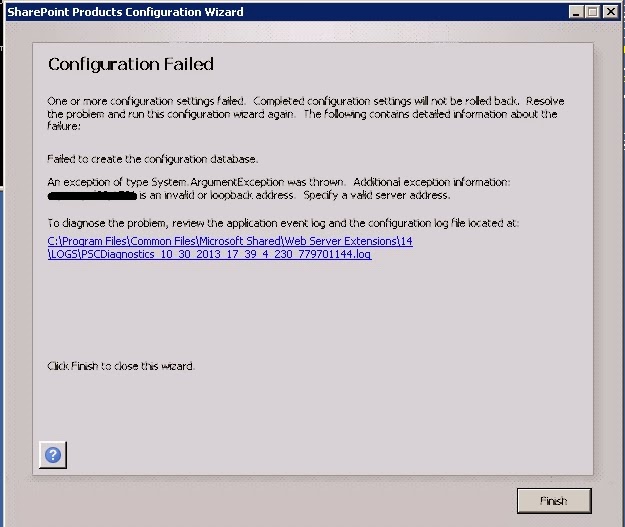
Recently I was installing SharePoint 2010 and the Configuration wizard failed giving me the below error

Failed to create the configuration database.
An exception of type System.ArgumentException was thrown. Additional exception information: [Server Name or IP Address], [Port] is an invalid or loopback access. Specify a valid server address.


We had a hardened environment where only a specific SQL port was made available.
On the Specify Configuration Database Settings screen, I entered the Database server in the below format (Database Server Name followed by a coma and the port number that was made available)

Database server: DATABASE-SERVERNAME,1581
Database name: SharePoint_Config_test


The fix

Enter in the below format(if there is only one instance of SQL in the database server) (append '\MSSQLSERVER' after the Database Server Name followed by the coma and the port number)

Database server: DATABASE-SERVERNAME\MSSQLSERVER,1581
Database name: SharePoint_Config_test


Propellerads